
lingdev
↓ 0 downloadsLingDev: a Godot / Unity-style game editor written in Ling. 2-D and 3-D scenes, Flash-style timeline and cutscenes, HUDs over 3-D, Ling scripting, audio / music / MIDI, builds for Windows, Linux, macOS, web, Raspberry Pi and LingOS. Ships with Ling Agent (an N64-style spy FPS), Ling Breaker (a 3-D breakout) and Moko's Picture Book (a kawaii storybook platformer).
lingfu install lingdevREADME
LingDev
A scene, timeline and cutscene editor for games written in Ling, in the look of LingStationX. It is itself a Ling program: it runs on the desktop ling runtime (Windows, Linux, macOS) and compiles into a LingOS kernel image as a built-in Raspberry Pi app, the same way LingStationX does.
run.bat                                   # Windows: starts the editor (log in lingdev.log)
ling run --interp ling/main.ling          # any platform, from this folder
ling run --interp ling/main.ling --project projects/Demo/lingdev.toml
The engine binary is ../ling/target/release/ling.exe (built with cargo build --release --bin ling in ../ling) or an installed ling (cargo install ling-lang). Set the path in Settings if it is somewhere else.
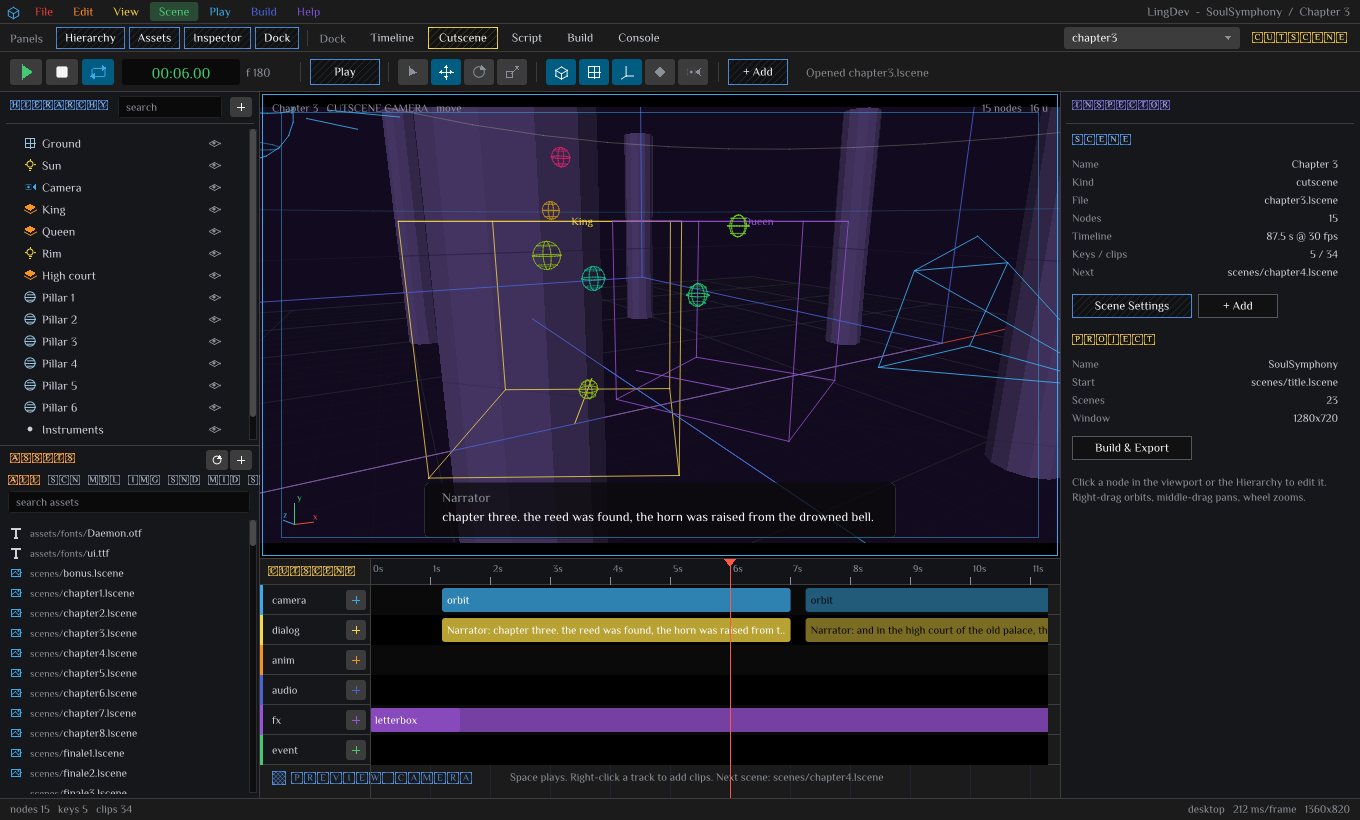
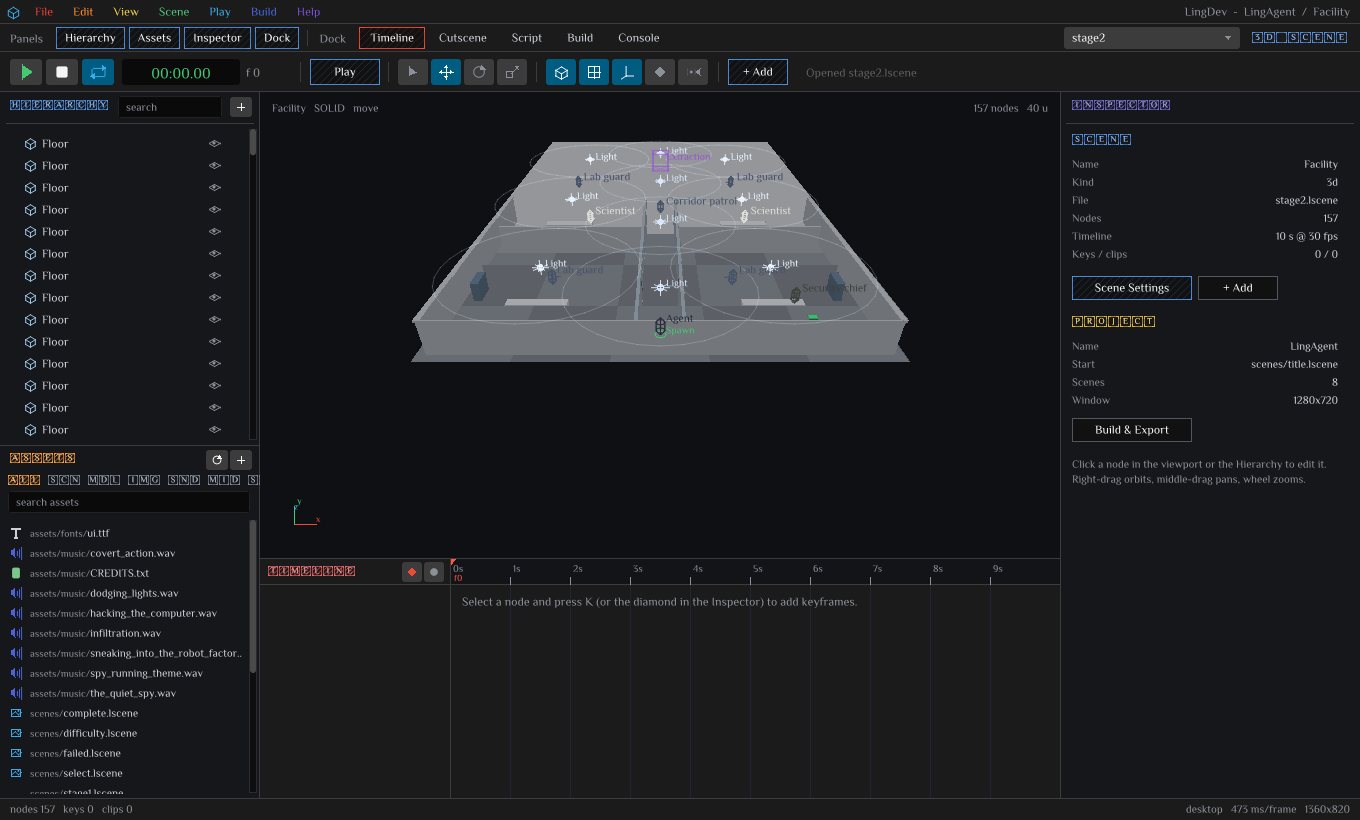
What is in the box
| Area | What you get |
|---|---|
| Scenes | 3d levels, 2d menus / HUDs, cutscene. A 3D scene names a 2D HUD scene drawn over it; a 2D menu can name a 3D scene drawn behind it. |
| Nodes | box, sphere, cylinder, cone, capsule, torus, plane, model (glb / gltf / lmesh, optional colour cycling), actor (rigged model or orb + controller), light, camera, spawn, trigger, audio, music, midi, 3D text, swarm (stars, wire cubes, orbs), knot (rosette chain of lit cubes), group; panel, label, button (framed or text-row style), image, bar for 2D. |
| Viewport | Orbit / pan / zoom / fly camera, grid, software renderer (wire or flat-lit solid), picking, move / rotate / scale gizmos with snapping, drag-and-drop from the asset browser, scene-camera and cutscene-camera preview. |
| Timeline | Flash-style layers with keyframe diamonds, ruler in seconds and frames, playhead, loop, auto-key, per-key easing (21 curves), key dragging, end-marker. Every transform and the kind-specific numbers can be keyed. |
| Cutscenes | Six tracks: camera (cut, move, orbit, follow), dialog (subtitle + voice file), anim (move node to, show / hide, model clip), audio (sound, music, stop), fx (fade in / out, letterbox, flash, shake), event (go to scene, call script hook, wait, end). Clips drag, resize, split, duplicate; double-click edits. |
| Levels | Spawn points, solid boxes / planes the player collides with, trigger zones with actions (goto:, cutscene:, say:, sound:, music:, call:, set:, add:, quit), player controller (WASD / arrows / gamepad, jump, gravity), camera rigs (fixed, orbit, follow, dolly). |
| 2D | Anchored controls (nine anchors), buttons with actions, bars and labels bound to game variables (health, score, any game_set key), images. |
| Scripts | .ling files in scripts/ attached to nodes by name; hooks _ready _update _draw _input _trigger _hit _net; a line-based code editor in the dock; runtime API for scenes, variables, sound, music, MIDI beats, AI steering, co-op networking. |
| Audio / music / MIDI | Positional sounds, background music, cutscene voice-over with lengths read from the files, MIDI tracks with a note ribbon and game_on_beat for rhythm games (desktop runtime). |
| Build | ling build targets: Windows, Linux, macOS, Web, Raspberry Pi kernel image, LingOS app; generated main.ling, Ling.toml, run and build scripts, a LingOS kernel manifest. |
| FPS stages | mode=fps scenes: first-person weapons with viewmodels, guards with patrol / alert / chase AI and articulated idle, walk, run, aim, hit and death poses, zoned damage, blood, decals, muzzle flashes, pickups, keycard doors, consoles, objectives by difficulty, a watch pause screen. The Ling Agent demo is built with it. |
| Breakout + Soul Symphony 2019 | mode=brick stages (Ling Breaker demo) and mode=soul levels (the 2019 original, ported): textured meshes from SVG, mesh collision, native particles, beat-synced effects from MIDI. |
| Platformer | mode=story pages (Moko's Picture Book demo): side-scrolling storybook platforming with fruit goals, enemies that turn into eggs, springs, one-way clouds and egg blocks, all built from tagged box and sphere nodes. |
| Import | File > Import Ling Game turns an existing Ling game into a project; Soul Symphony's cutscenes, voice-over, models, music and hub level come across. |
The window
 File  Edit  View  Scene  Play  Build  Help                       LingDev - project / scene
 Panels: Hierarchy Assets Inspector Dock   Dock: Timeline Cutscene Script Build Console   [scene v]
 > [] loop  00:00.00 f0   Play   select move rotate scale   solid grid snap autokey campreview  + Add
 +-----------+------------------------------------------------+-----------------+
 | Hierarchy |                                                |  Inspector      |
 |           |             viewport (3D orbit / 2D canvas)    |                 |
 +-----------+                                                |                 |
 | Assets    +------------------------------------------------+                 |
 |           |  dock: timeline | cutscene | script | build | console            |
 +-----------+------------------------------------------------+-----------------+
 nodes keys clips  selected                                   runtime  ms/frame
Everything is drawn with the LingStationX toolkit (core.ling, ds.ling, icons.ling): the egui-dark chrome, ROYGBIV keys, tile lettering, crosshatch buttons.
Working
- File > New Project. Pick a template: empty 3D scene, 3D level + 2D HUD, 2D menu + 3D background, cutscene demo, rhythm / MIDI demo. The folder gets
lingdev.toml,Ling.toml,scenes/,scripts/,assets/, the runtime inrt/, a generatedmain.lingandrun.bat. - Add nodes with Scene > Add, the
+ Addbutton, Shift+A, or by dragging a model / sound / MIDI / image from the Assets browser into the viewport. - Move things: Q W E R pick the tool; drag the gizmo axes or the node itself; the Inspector has draggable numbers (double-click to type, Shift for fine steps) and a key diamond per property.
- Animate: set the playhead, change a property, press K (or turn Auto Key on). Space plays, L loops,
,and.step frames. Right-click a key for its easing. - Cutscene: Scene > Convert to Cutscene (or a new cutscene scene); right-click a track to add clips; the viewport shows the cutscene camera at the playhead; set the Next scene in Scene Settings.
- Play: F5 plays the project from its start scene inside the editor, F6 plays the open scene, Esc stops. Everything the editor shows is restored afterwards.
- Build: the Build dock tab (Ctrl+B) has one card per target. Build writes
build_<target>.bat / .shnext tomain.lingand opens it.Run (ling run)opensrun.bat.
Help > Shortcuts lists every key; Help > Scripting Reference lists the hooks and the runtime API.
Viewport camera
| Input | Action |
|---|---|
| Right-drag | Orbit |
| Middle-drag, Shift + right-drag | Pan |
| Wheel | Zoom |
| Right button + W A S D (Q / E) | Fly |
| F, Home, Numpad 7 / 1 / 3 | Focus selection, reset, top / front / side |
| Camera toolbar button | Look through the scene's camera node |
Runtime cameras are camera nodes with a rig: fixed (its pose), orbit (around a target node, distance, pitch, optional spin), follow (behind the target, mouse right-drag turns), dolly (its keyed position / rotation on the timeline). Cutscene camera clips override the rig while they play. Without a camera node the game orbits the player.
Scripting
A node's Script field names scripts/<name>.ling. The generated main.ling uses every script and routes the hooks the file defines:
fn enemy_ready(i) { }                 # once, after the scene loads
fn enemy_update(i, dt) { }            # every frame
fn enemy_draw(i) { }                  # extra drawing after the node
fn enemy_input(i, key) { }            # a key was pressed this frame
fn enemy_trigger(i, other) { }        # a trigger with this script fired (other = the player)
fn enemy_hit(i, other) { }            # the player overlapped this node
fn enemy_net(i, msg) { }              # a network message arrived
Inside a hook, nd_get(i, "px") / nd_set(i, "py", v) read and write the node (columns: px py pz rx ry rz sx sy sz col src vis lock tag scr a b c d txt w h anc). The runtime API lives in rt/rt_game.ling (game_goto, game_push_hud, game_play_cutscene, game_player, game_find, game_spawn, game_destroy, game_var / game_set, game_say, game_sound, game_music, game_sfx, game_axis_x/y, game_key, game_on_beat, game_midi_notes, net_host_game, net_join_game), rt/rt_ai.ling (ai_seek, ai_flee, ai_patrol, ai_wander, ai_guard, ai_look_at, ai_dist, behaviour trees through ai_bt), and rt/rt_cam.ling.
Scripts run in the built game and under ling run main.ling; the editor's Play uses the built-in behaviours (controller, rigs, triggers, timelines, cutscenes, HUD buttons) and does not load project scripts into itself.
Build targets
| Target | Command written to the build script | Output |
|---|---|---|
| Windows x86-64 | ling build . --platform win --pack --out dist | dist/windows/<name>.exe |
| Linux x86-64 | ling build . --platform lin --pack --out dist | dist/linux/<name> |
| macOS | ling build . --platform mac --pack --out dist | dist/macos/<name> |
| Web | ling build . --platform web --out dist | dist/web/ |
| Raspberry Pi kernel | ling build . --platform rpi --out dist | dist/rpi/kernel8.img |
| LingOS app | ling build . --platform lingos --out dist | dist/apps/<name>.elf |
Each project also gets main_os.ling (the same game on the LingOS platform layer: software renderer, no audio, read-only files) and lingos/Ling.toml, a kernel manifest that bundles the game into the LingOS Pi desktop next to LingStationX.
The editor cannot spawn processes from inside the ling runtime, so Build and Run open the generated scripts through the shell (fs_reveal): on Windows that runs them, elsewhere it opens the folder and you run build_<target>.sh yourself.
Raspberry Pi 5 and LingOS
../LingOS/kernel/rpi-lingdev/Ling.toml bundles this editor into the Pi kernel image (ling build kernel/rpi-lingdev --platform rpi --out dist, then live/build-sdcard-rpi.ps1), and kernel/x86_64-lingdev does the same for the x86-64 desktop image you can boot in QEMU. The LingOS desktop (apps/lingdesk) shows LingDev in the dock and the Applications menu when the image contains it. LingOS's aarch64 HAL targets the Pi 3 / 4 memory map today; a Pi 5 (BCM2712 + RP1) needs the HAL follow-up described in LingOS/live/build-sdcard-rpi.sh before that board boots it.
Building LingDev itself
tools/build_dist.sh builds the editor for every target this machine can build, into dist/:
| Target | Output | How |
|---|---|---|
| Windows x86-64 | dist/windows/lingdev.exe with ling/ and assets/ | ling build . --platform win, with LING_APP_INTERP=ling |
| Linux x86-64 | dist/linux/lingdev with ling/ and assets/ | Built natively in a rust:1-bookworm Docker container |
| LingOS x86-64 | dist/lingos-x86_64/kernel/lingos-lingdev-x86_64 | ling build kernel/x86_64-lingdev --platform kernel in ../LingOS |
| LingOS Raspberry Pi | dist/lingos-rpi5/rpi/kernel8.img | ling build kernel/rpi-lingdev --platform rpi in ../LingOS |
| macOS | Needs Apple's SDK. On a Mac: LING_APP_INTERP=ling ling build . --platform mac --out dist |
LING_APP_INTERP=ling selects ling build's portable launcher. The executable runs ling/main.ling on the interpreter from the ling/ folder beside it, so the editor's use "rt/..." layout stays intact. Keep the executable next to its ling/ and assets/ folders. Linux is built inside Docker because the audio, window and gamepad crates need Linux's ALSA, udev and X11 / Wayland libraries, which do not cross-compile from Windows.
The Pi image builds, but LingOS's aarch64 HAL targets the Pi 3 / 4 memory map. A Pi 5 (BCM2712 + RP1) needs the HAL follow-up described in LingOS/live/build-sdcard-rpi.sh before it boots. Neither LingOS image was boot-tested here, because no QEMU is installed. On LingOS the editor runs its software renderer, so the brick and soul modes, which need the desktop's textured-mesh builtins, do not run there.
On the in-kernel runtime the editor keeps its full interface and the software 3D viewport; it reads projects from the embedded file table (includes in the manifest) and cannot write them yet.
Soul Symphony
File > Import Ling Game, pick ../soul-symphony-ling. The importer builds projects/SoulSymphony from the game's own files (models are its .lmesh meshes, voice and music stay in its folder):
- Title: the original's press-start screen. The five palace pieces sit on the horizon cycling colour like the original (
hue=on the mesh), under the blue title fog and a starry sky. Wire cubes, letters and the knotwork rosette drift past. The logo bobs, and "press start" blinks in the Daemon font over the pink ink floor. The title playsSoulSymphony.wav. - Main menu: the original rows and order (load game, new game, level select, multiplayer, options, language, quit). They are plain text rows in the ROYGBIV keys with the ink cursor on the selected row, over the original backdrop: the dark fill, warm front light, and the six-petal Celtic knot of 30 rainbow cubes lit by three lights circling the knot. The menu plays
Main_Menu.wav. Arrows / W S / gamepad move, Enter / Space / A select, Esc goes back. - Level select, multiplayer, options: the same look. Level select lists the hub and every story scene; multiplayer hosts or joins co-op; options sets volume, subtitles and language.
- 14 cutscenes: intro, prelude, chapters 1 to 8, bonus, finales 1 to 3, with all 263 voiced lines. Each line is a dialog clip with its speaker, text and
game/voice/<scene>/NN_<role>_en.wav, and its length is read from the wav. Each line also gets a camera shot that alternates orbit, over-the-shoulder, close and wide, the way the original cuts between shots. Letterbox and fades frame each scene, it plays the chapter's music, andNextfollows the story order. - Backdrops in each chapter's mood, built from scene nodes you can edit:
Scene Backdrop Intro Snow-globe planet with a ring, stars, comets Prelude Lanterns and falling leaves Chapter 1 The marching meadow's trees and fireflies Chapter 2 The moon-eye sinking over the old palace, reeds Chapter 3 The high court with colour-cycling pillars; the cold comet strikes with a flash and shake Chapter 4 The wormhole of spinning rings, bronze drums, the water and fire spirits circling Chapter 5 The cold light swelling then shattering, strobes, snow Chapter 6 The breathing palace floor, orbiting shards, the plum daemon with gold eyes and wings, the letter ring Chapter 7 The star sea with reflections, lantern buoys, the galaxy wheel, the train of light Chapter 8 Pop-art colours, the five palace pieces flying home, the letter choir Finales The palace floor split by the gap, Coda, the daemon, the spirits, the final chord Bonus Coda riding the loop-de-loop - Hub cathedral: the room from
game/level.ling, with floor y=3, ceiling -171, walls at plus or minus 256, door gaps of plus or minus 40, four corridors and eight pillars. The king, the queen and the temple stand in it. You play the orb (shape=sphere) and a follow camera tracks you. Triggers sit at the wings, and the court trigger plays chapter 1. run_original.batplays the original game from its folder.
What stays in the original: the procedurally generated levels, the boss fights, the arcade mode, saves, and the glyph-baked menus in Thai / Korean / Japanese / Chinese. The LingDev edition speaks English, with subtitles from the dialogue export.
Ling Agent (FPS demo)
A small first-person spy shooter in the style of the late-90s console classics ships with the app. Open it with File > Open Demo: Ling Agent (FPS) and press Play, or build it like any project. The demo is generated by ling/demo_agent.ling into projects/LingAgent; Help > Rebuild the Ling Agent demo regenerates it.
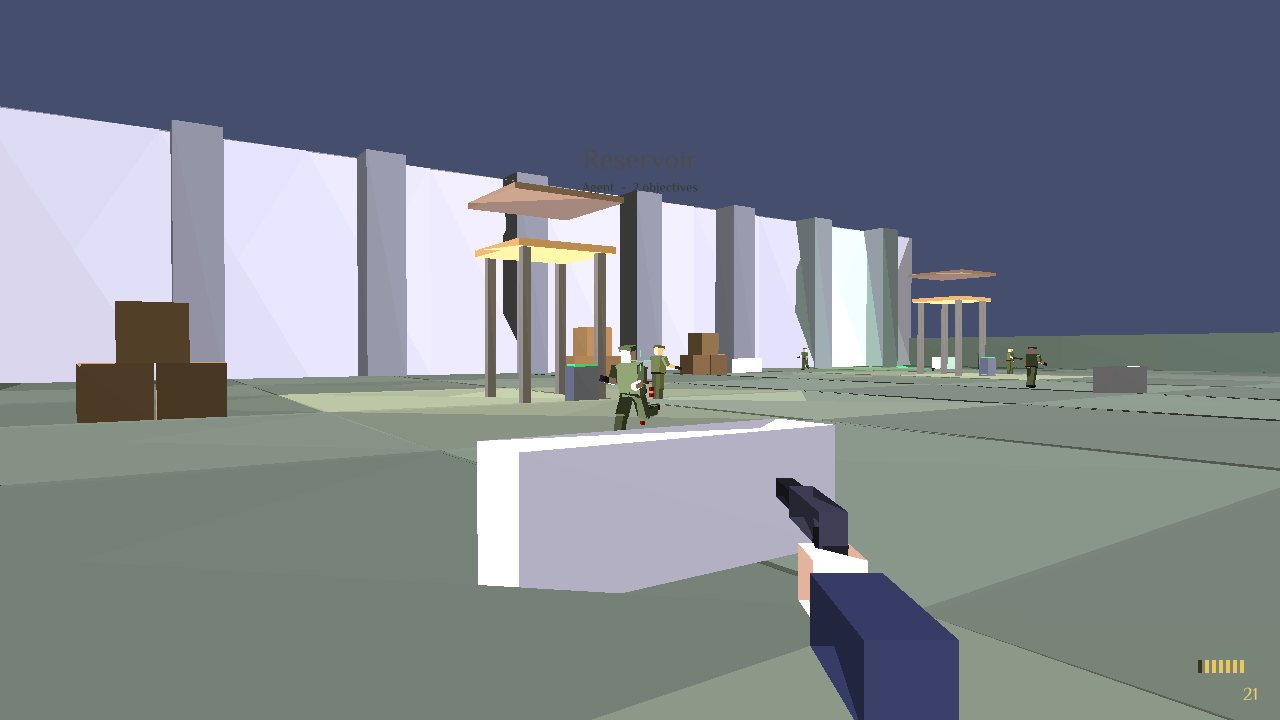
- Menus: a title screen over the first stage, a dossier mission select with briefings and completed stages ticked, difficulty select (Agent, Special Agent, Elite Agent), and mission complete / failed dossiers with time, accuracy, kills and headshots.
- Stages:
Stage Objectives (Special Agent) Reservoir Destroy 2 alarm consoles, eliminate 5 hostiles, reach extraction Facility Find the keycard, destroy the console, eliminate 6 hostiles, reach extraction Bunker Recover the data disk, eliminate all hostiles, reach extraction
Agent keeps only the first objective plus extraction. Elite makes guards faster and more accurate. - Arsenal: slappers, PK9 silenced pistol, Vole SMG, D5 assault rifle and riot shotgun. Each has its own viewmodel, rate, spread, recoil, magazine and reload, muzzle flash, light and ejected brass.
- Guards: soldier, guard, scientist and officer looks. They patrol, spot you by line of sight, hear gunfire, chase, aim and fire back. Animations cover idle, walk, run, aim, hit flinch and three death falls. Hits are zoned: headshots kill, legs take less. Blood sprays onto nearby walls and pools under bodies, and a dead guard drops his weapon.
- World: bullet holes, scorch and blood decals, sparks, debris and smoke, pickups for weapons, ammo, body armour and mission items, sliding doors that open as you approach (some need a keycard), destructible consoles, and the health / armour arcs shown when you are hit.
- Music: CC0 tracks from OpenGameArt, credited in
assets/music/agent/CREDITS.txt. The title plays "Spy running theme" (sauer2), the dossier menus "The Quiet Spy" (HydroGene), Reservoir "Covert Action" (congusbongus), Facility "Sneaking into the Robot Factory" (Umplix), Bunker "Infiltration" (Adiutorium), and the complete / failed screens two more tracks from Umplix's Sneaky Music Pack. Rebuilding the demo copies them into the project'sassets/music. A scene keeps the track already playing when itsmusicis the same file. - Mouse look: the mouse is captured in the standalone game and in editor Play, and turning is unlimited. P / Tab shows the cursor again on the watch; Esc stops Play in the editor.
Controls:
| Action | Keyboard / mouse | Gamepad |
|---|---|---|
| Move / strafe | W A S D | Left stick |
| Look | Mouse (captured), arrows, Page Up / Down | Right stick |
| Fire | Left mouse, Ctrl | Right trigger |
| Reload | R | |
| Weapon | 1 to 5, Q / E, mouse wheel | |
| Watch (pause, objectives) | P, Tab, Esc | |
| Abort mission | Q on the watch |
Make your own stage: Scene > Add FPS > Make stage sets mode=fps on the scene, then add guards, pickups, doors, consoles and the exit from the same menu. Node options live in the Inspector's ex field, for example weapon=smg;look=officer;patrol=4_0_4_8 on a guard or lock=keycard on a door. The scene's obj=consoles_2,kill_5,item_keycard,exit lists its objectives.